The following are instructions to submit invoices and AIA Applications for Payment (G702).
- For Unity Construct projects: See the Invoice Submission user guide [1] and watch the Invoice Submission training video [2].
- For Project Control System (PCS) projects: See instructions below.
- Unclear if it is a Unity or PCS project: Contact the Yale project manager.
Invoices and AIA Applications for Payment
Submit all invoices using the Project Management Invoice Submission Form [3] (Google account required). If you do not have a Google account, find instructions below for Invoice Submissions Account Setup.
To expedite processing and payment, the following information must be noted on all invoices:
- Full Yale project name
- Yale project number
- Purchase order number (i.e. P_ _ _ _ _PCS)
- Invoice date (must be on or after the project start date)
- Invoice number
The Yale project name, project number, and purchase order number can be found in the contract provided by Contract Administration at Yale. To request a copy of your contract, contact contract.administration@yale.edu [4]. Invoices that are missing any of the information listed above will not be processed.
When required by contract, provide the following documents signed and notarized (if applicable):
- Contractor’s and subcontractor’s AIA Application for Payment (G702)
- Contractor’s and subcontractor’s AIA Schedule of Values (G703)
- Contractor’s and subcontractor’s Waiver of Mechanic’s Lien and Release
These documents can be found on the Contractors and Consultants page [5]; filter by “Contract Forms.” Note, the signatory for a contractor’s and subcontractor’s AIA Application for Payment (G702) should be designated as “N/A” if an architect’s signature is deemed unnecessary.
- For process-related questions: project.management@yale.edu [6].
- For invoice status inquiries: askfinance@yale.edu [7].
Invoice Submissions Account Setup
- Go to the Yale Project Management Invoice Submission Form [8]
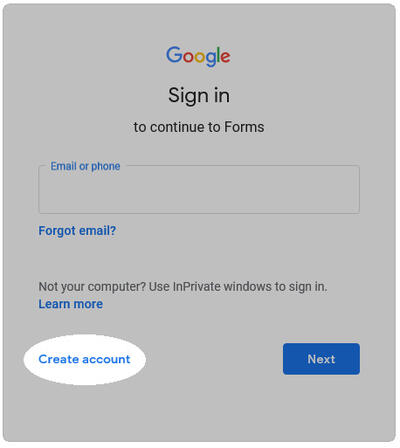
- At the sign in prompt, click “Create account.”
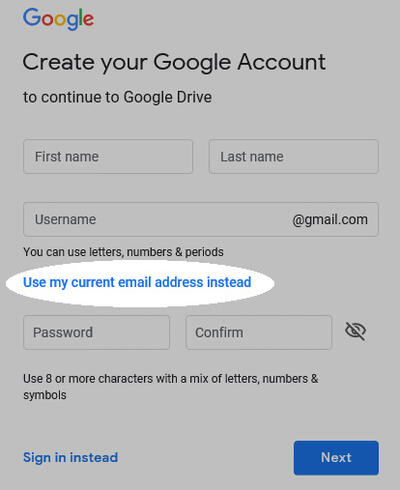
- At the create your Google account prompt, click “Use my current email address instead.” Enter your contact information and create a password.
- Verify your email address using the email sent by Google, then complete security questions.
- The Yale Project Management Invoice Submission Form [3] should now be available to you. Please upload your invoice along with relevant invoice information.
- Once the invoice has been submitted, you will receive an email receipt and your invoice will be submitted to the processing center.